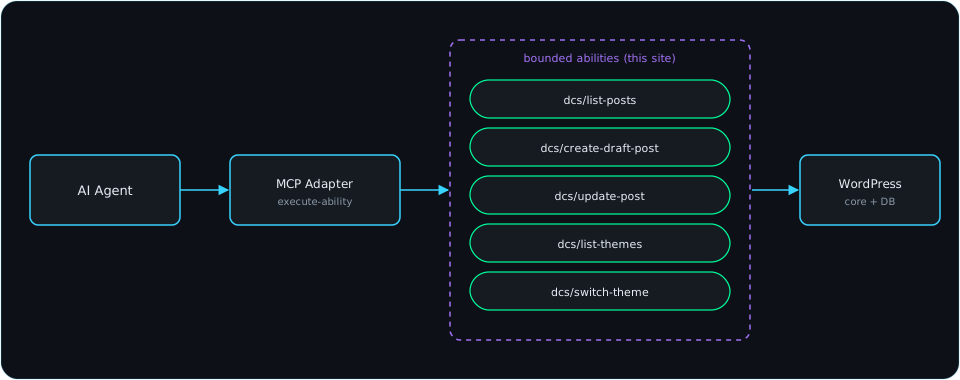
We just wired up WordPress’s official MCP Adapter on this site so an AI agent (Claude Code) can manage content and theming through structured tool calls instead of ad hoc scripts. Here’s what stood out after actually using it end to end.
Pros
- It’s a core-backed standard, not a hack. The Abilities API landed in WordPress core as of 6.9, and the MCP Adapter is an official WordPress.org project layered on top of it — not a third-party plugin bolting AI access onto WordPress from the outside.
- Bounded by design. Instead of exposing arbitrary code execution, you register specific, named abilities (“create a draft post,” “switch the active theme”) with their own input schemas and permission checks. It replaced a much riskier pattern we were using before — dropping one-off PHP scripts into the webroot, running them once, and deleting them.
- Uses standard WordPress auth. Application Passwords, the same mechanism WordPress already ships for REST API access — no new auth system to trust.
- Self-describing. A
discover-abilitiescall lists everything available;get-ability-inforeturns full input/output schemas per ability. An agent (or a person) can figure out what’s possible without reading source code. - Extensible in a few lines. Registering a new ability is a single
wp_register_ability()call with a label, schema, permission callback, and execute callback — a handful of these covered posts and themes for this site.
Cons / friction points
- Silent breakage on default permalinks. This site was still on WordPress’s default “Plain” permalink structure, which broke
/wp-json/routing in a confusing way — requests didn’t 404, they fell through and served the homepage HTML instead of a JSON error. Easy to misdiagnose as an auth or server problem when it’s actually a permalink setting. - New MCP servers don’t hot-load into a running session. After registering the server, tool calls failed until the client (Claude Code) was fully restarted — a new subagent within the same running process wasn’t enough. There’s no in-session refresh.
- “Connected” can be misleading. Connection-status checks confirmed the transport handshake succeeded, not that tool definitions had actually loaded for a given session — those turned out to be two different things.
- Almost nothing is exposed out of the box. Past a handful of read-only meta/site-info abilities, there’s no built-in “create a post” or “manage plugins” capability — every real content-management action had to be hand-written as a custom plugin.
- The scoping responsibility shifts to you. Because abilities are so easy to register, it’s tempting to expose more than necessary. We deliberately kept post creation limited to drafts (never direct publish) and left anything resembling arbitrary command execution out entirely — that discipline has to be applied by whoever writes the abilities, the framework won’t stop you from registering something dangerous.
Verdict
Worth it. The rough edges were all discoverable and fixable in one sitting, and the end state — a small, auditable set of named, schema-checked actions — is a meaningfully better security posture than the file-drop workaround it replaced.
Leave a Reply